
How to make a professional LinkedIn headshot with ChatGPT (8 prompts that actually work)
Your LinkedIn photo is from a conference in 2022 and you hate it.
You know the one. Slightly flushed, someone's shoulder cropped out of the left edge, a lanyard you've digitally wished away a hundred times.
Meanwhile your whole feed has quietly refreshed itself this fortnight, and everyone seems to have a crisp new portrait that looks like it cost a fortune. A few of them did not pay a cent. An AI headshot is a professional-looking portrait generated from a photo you already own, using an image model like the one built into ChatGPT, so you skip the studio, the booking, and the awkward "now tilt your chin" entirely.
Done badly it looks like a wax figure of you. Done well it looks like the best photo a friend ever took of you on a good day. Here are the eight prompts I use, the lighting language that genuinely changes the result, and the one rule that keeps the face yours.
Can ChatGPT really make a LinkedIn headshot that looks professional?
Yes,and the gap between a cheap-looking result and a genuinely usable one comes down to the words you give it. ChatGPT's image generator can take a clear photo of you and re-light and re-stage it into a studio-style portrait in about a minute. The trick is that a vague request ("make me a professional headshot") gives you a generic stranger who happens to share your haircut, while a specific prompt that names the lens, the lighting, and the wardrobe gives you something that reads as a real photograph of you.
I tested this properly before I'd recommend it to anyone. I dropped one ordinary phone photo into ChatGPT, ran each of the eight prompts below, and compared them side by side. The ones that named a camera and a light source came back looking like portraits. The lazy ones came back looking like LinkedIn stock photography wearing my face. Specificity is the whole game.
What photo should I upload to get the best result?
Start with one clear, front-on photo where your face is well lit and nothing is blocking it. Natural daylight from a window beats a harsh overhead bulb every time, and a plain-ish background gives the model less to argue with. Leave out the sunglasses and the heavy filter, and avoid the cropped group shot, because the model fills those gaps with guesswork and the guesswork is where the uncanny creeps in.
If you've got a few options, pick the one where you actually look like yourself on a Tuesday, not the one where you're laughing at something off-camera. The model anchors hard to whatever you give it, so a calm, clear reference is doing half the work before you've typed a single word.
What are the 8 ChatGPT prompts for a professional headshot?
Here are the eight, each tuned for a different feel, from warm and approachable through to a proper Forbes-cover look. Add your photo to ChatGPT's image generator, paste one prompt in, and let it run. You can copy the text straight from here, or screenshot the prompt, drop it into ChatGPT, and ask it to extract the words for you.
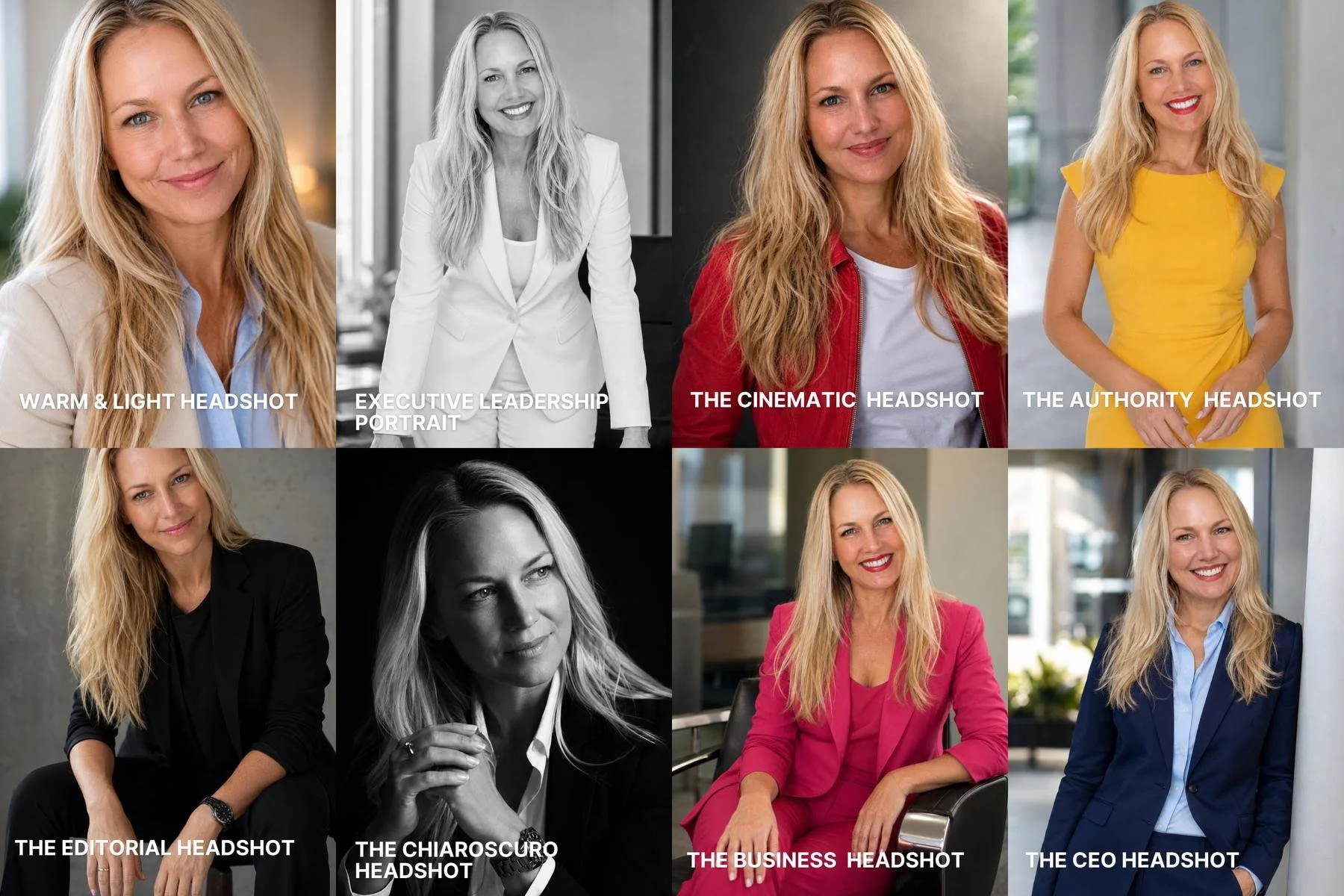
Headshot 1: Warm and light headshot
Prompt: Create a warm, approachable professional portrait of the person in the uploaded reference photo. Preserve their exact facial features, age, skin texture, body proportions, and natural asymmetry. The subject stands comfortably with relaxed shoulders and a slight lean towards the camera. Expression is friendly, genuine, and confident. Wardrobe: light beige blazer with a soft blue shirt. Background: elegant neutral interior with shallow depth of field. Lighting: natural window light with soft highlights and realistic skin tones. Photographed on a Canon EOS R5 with an 85mm lens. Visible skin texture, realistic eyes, authentic smile, subtle imperfections, premium corporate photography. No beauty filters, no excessive retouching, no text, no logos, no facial changes.
Headshot 2: Executive leadership portrait
Prompt: Create an ultra-realistic executive portrait of the person in the uploaded reference photo. Preserve their exact facial identity, age, skin texture, proportions, and natural asymmetry. The subject stands behind a modern desk, leaning slightly forward with both hands resting naturally on the surface. Expression is warm, confident, approachable, and authentic. Wardrobe: tailored business attire. Background: premium modern office, softly blurred. Lighting: soft natural window light with realistic highlights and shadow falloff. Camera: Canon EOS R5, 85mm lens, f/2.8. Style: Forbes CEO portrait, premium corporate photography, photorealistic skin texture, natural eye reflections, realistic depth of field. Negative prompt: no facial alterations, no beauty filters, no excessive retouching, no body reshaping, no distorted hands, no AI artefacts, no text, no logos, no watermarks.
Headshot 3: Cinematic headshot
Prompt: Create a highly cinematic portrait of the person in the uploaded reference photo while preserving their exact facial identity, age, proportions, and skin texture. The subject wears a white T-shirt beneath a red jacket and faces the camera with a calm, confident expression. Background: dark-to-light cinematic gradient with natural depth and subtle atmosphere. Lighting: soft cinematic key light with realistic shadow shaping and gentle contrast. Photographed with an 85mm portrait lens. Photorealistic skin texture, detailed eyes, realistic fabric textures, natural hair detail, premium film-poster quality without looking stylised or AI-generated. No facial alterations, no excessive sharpening, no beauty filters, no artefacts.
Headshot 4: Authority headshot
Prompt: “Create a sophisticated authority portrait of the person in the uploaded reference photo. Preserve their exact facial features, age, proportions, skin texture, and natural asymmetry. The subject stands with relaxed shoulders, straight posture, and hands loosely positioned. Expression is calm, credible, and quietly powerful. Wardrobe: tailored navy suit and light blue shirt. Background: minimalist architectural space with soft depth and muted tones. Lighting: natural overcast daylight with soft contrast. Photographed on a Nikon Z8 with an 85mm lens. Realistic skin texture, visible pores, authentic eye detail, premium executive portrait photography. No fashion exaggeration, no theatrical lighting, no face alterations, no text.”
Headshot 5: Editorial headshot
Prompt: Create a premium editorial portrait of the person in the uploaded reference photo. Preserve their exact facial features, proportions, skin texture, age, and natural asymmetry. The subject sits on a studio stool, leaning slightly forward with forearms resting naturally on their thighs and hands relaxed. Expression is thoughtful, intelligent, and quietly confident. Wardrobe: minimalist black jacket over a dark crew-neck shirt. Background: soft grey concrete studio backdrop with subtle texture. Lighting: soft directional editorial light with gentle shadow falloff and realistic skin highlights. Photographed on a Sony A7R V, 50mm lens, shallow depth of field. Ultra-realistic commercial photography, visible skin pores, natural hair detail, realistic eyes, no beauty retouching, no filters, no text, no logos, no facial alterations.
Headshot 6 Chiaroscuro headshot
Prompt: Create an ultra-realistic black and white cinematic portrait of the person in the uploaded reference photo. Preserve their exact facial features, proportions, age, skin texture, and natural asymmetry. The subject sits at a three-quarter angle with hands naturally interlocked. Expression is contemplative and intelligent. One side of the face is illuminated by dramatic directional light while the opposite side fades into rich shadow. Wardrobe: black tailored jacket over an open-collar white shirt. Background: seamless black studio backdrop. Photographed with an 85mm portrait lens. Crisp eyes, realistic skin texture, fine hair detail, subtle catchlights, authentic shadow transitions, premium magazine photography quality. No plastic skin, no beauty filters, no distorted hands, no extra fingers, no AI artefacts.
Headshot 7: Business headshot
Prompt: Create an ultra-realistic executive portrait of the person in the uploaded reference photo. Preserve their exact facial identity, age, skin texture, proportions, and natural asymmetry. The subject sits comfortably in a modern executive chair with relaxed posture. One arm rests naturally on the armrest while the other rests casually on their thigh. Wardrobe: tailored dark suit with light shirt. Background: contemporary office environment softly blurred. Lighting: soft commercial studio lighting with subtle highlights. Photographed using a Phase One medium-format camera with a 40mm lens. Realistic skin detail, natural eye reflections, authentic fabric texture, premium corporate photography quality. No facial modifications, no beauty filters, no text, no logos.
Headshot 8: CEO headshot
Prompt: Create a premium CEO portrait of the person in the uploaded reference photo. Preserve their exact facial identity, age, skin texture, proportions, and natural asymmetry. The subject stands naturally with weight shifted slightly, leaning against a modern architectural feature. One hand is in a pocket while the other remains relaxed. Wardrobe: tailored navy suit and light blue shirt. Expression: confident, approachable, and authoritative. Background: modern office lobby or executive terrace softly out of focus. Lighting: clean natural daylight with realistic shadow transitions. Photographed on a Canon EOS R5 with a 50mm lens. Ultra-realistic commercial photography, visible skin texture, natural hair detail, authentic smile, realistic depth of field, magazine-quality executive portrait. No forced expressions, no facial alterations, no beauty filters, no text, no logos.
If you only run one before your coffee goes cold, run number one. It's the most forgiving, and the warm window light flatters almost everyone.
Why does naming a camera and a lens change the result?
Because the model has learned what photos taken on those cameras actually look like. When you write "Canon EOS R5, 85mm lens", you're not being fancy, you're handing the model a whole library of real portrait photography to imitate, with the soft background blur and natural skin rendering that an 85mm portrait lens is known for. Leave it out and the model defaults to a flat, over-lit, slightly plastic look that everyone now recognises as AI.
The lighting words do the same job. "Natural window light with soft highlights" pulls the result towards something a human photographer would have set up, while "visible skin texture" and "subtle imperfections" stop the model from sanding your face into a mannequin. The negative prompt at the end of each one ("no beauty filters, no facial changes") is the quiet hero, because it tells the model what to leave alone, and what it leaves alone is the part that makes the photo look like you.
What's the one rule for keeping it looking like you?
Preserve the face, change the setting. That single instruction, "preserve their exact facial features, age, skin texture, and natural asymmetry", is the line that separates a headshot you can actually use from a flattering stranger. Every prompt above carries it for a reason.
The bit nobody mentions is this. The model wants to make you younger and smoother, because somewhere in its training it learned that's what "professional" looks like. That instinct is exactly what gets you a photo your own colleagues wouldn't recognise. The asymmetry, the lines, the texture, those are the things that make the photo read as a real human rather than a generated one, so they're the last things you want sanded away. When you run these, check the eyes and the smile first. If they feel like you on a good morning, keep it. If they feel like your slightly uncanny cousin, the model has over-smoothed, and you add the words "keep my natural lines and skin texture, do not slim or de-age my face" and run it again.
Is it okay to use an AI headshot on LinkedIn?
It's fine, as long as the photo still genuinely looks like you when you walk into a meeting. LinkedIn is about trust, and the only way an AI headshot breaks trust is when the person who turns up looks nothing like the portrait. Keep it honest, keep your real face, and a clean AI headshot is no more deceptive than a good photographer with a flattering light. You're not inventing a new person, you're skipping the four-hundred-dollar booking to look like yourself on a day the lighting cooperated.
Where I'd pause is the full fantasy version, the one that drops you twenty years and forty press-ups. There's no rule against it, but the first time someone meets the real you, that gap does quiet damage to your credibility. Aim for the best recent photo of you, the one taken on a day everything cooperated, rather than a stranger wearing your name.
Frequently asked questions
Which AI tool makes the best LinkedIn headshots?
ChatGPT's built-in image generator handles all eight prompts above and is the simplest place to start, because you upload your photo and type in the same window. Dedicated headshot apps exist, but most of the result quality comes from the prompt, not the tool, so a strong prompt in ChatGPT beats a weak one in a paid app.
Do I need a paid ChatGPT plan to generate headshots?
Image generation is available on ChatGPT's paid tiers and, in limited form, on the free tier. If you're running all eight prompts and comparing them, a paid plan removes the daily limits that interrupt the fun.
How do I stop the AI headshot looking fake?
Name a camera and an 85mm lens, ask for natural window light, request visible skin texture and subtle imperfections, and add a negative prompt that bans beauty filters and facial changes. Every prompt above is built this way for that reason.
How many photos do I need to upload?
One clear, well-lit, front-on photo is enough for these prompts. More reference photos can help consistency, but a single good one beats several mediocre ones.